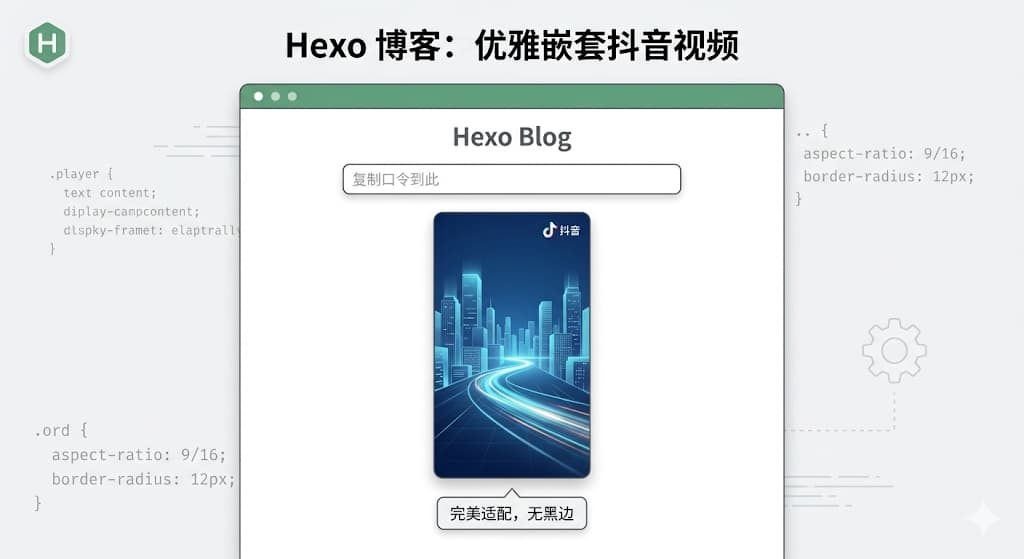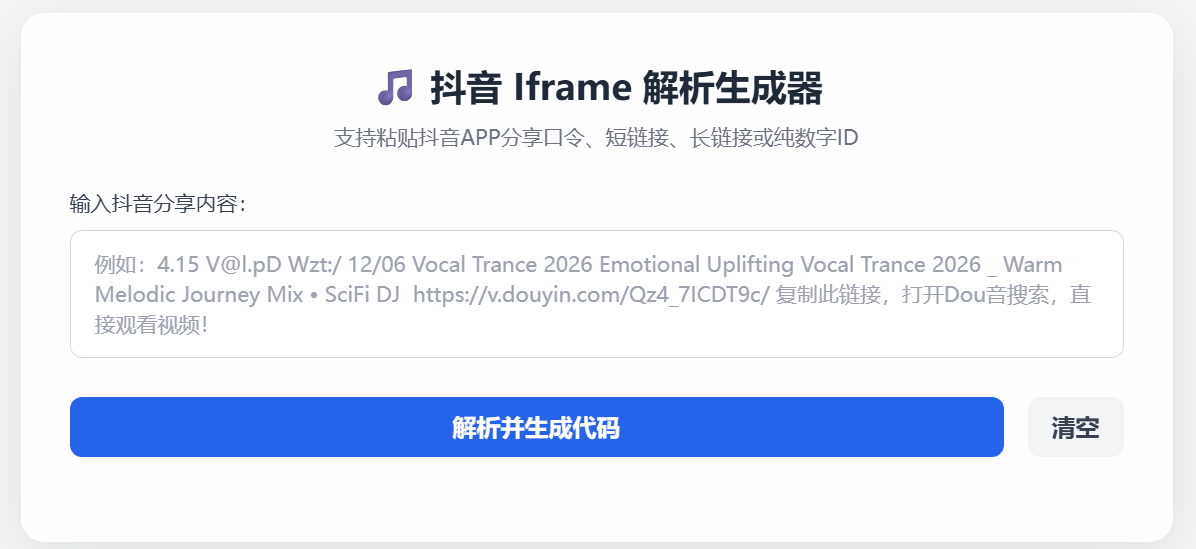
乱转的时候看到友人博客文章里说,怎么在博客里分享一个抖音视频。我就心痒痒想尝试一下。借助ai的能力~ 弄起来!
首先,抖音 App 里复制出来的都是包含 v.douyin.com 的短链接口令,前端直接用的话根本拿不到视频的真实 ID;其次,抖音的视频大部分是 9:16 的竖屏,如果直接丢进博客,会出现巨大的黑边和丑陋的滚动条。
先让ai写一个支持解析短链接口令、且能生成完美适配移动端竖屏 UI 的代码生成器。
踩坑第一步:纯前端的跨域之痛
一开始,我想得挺简单。抖音官方的 iframe 地址长这样:
https://open.douyin.com/player/video?vid=视频ID&autoplay=0
只要用正则表达式从输入框里把那 19 位的视频 ID 抠出来,替换进去不就行了?
对于长链接确实可以,但如果是类似 https://v.douyin.com/OZhNIu_NYDY/ 这种短链接,纯前端 JavaScript 就会撞上浏览器的 CORS(跨域安全限制) 这堵高墙。前端无法直接去请求并跟随这个短链接跳转来获取真实地址。
虽然试过用第三方的免费代理 API(比如 AllOrigins)来绕过,但免费的节点实在太抽风了,经常超时。
Python 后端来救场
既然前端干不了,那就交给后端。刚好服务器上有环境,继续用 Python 的 Flask 框架写了一个极简的本地 API 接口。
它的逻辑极其简单:接收前端传来的短链接 -> 伪装成浏览器发起请求 -> 获取 302 跳转后的真实长链接 -> 提取 19 位 ID -> 返回给前端。
后端完整代码 (api.py):
1
2
3
4
5
6
7
8
9
10
11
12
13
14
15
16
17
18
19
20
21
22
23
24
25
26
27
28
29
30
31
32
33
34
35
| Python
import requests
import re
from flask import Flask, request, jsonify
from flask_cors import CORS
app = Flask(__name__)
CORS(app) # 开启跨域,允许前端调用
@app.route('/parse', methods=['GET'])
def parse_douyin():
short_url = request.args.get('url')
if not short_url:
return jsonify({"status": "error", "msg": "缺少 url 参数"}), 400
try:
headers = {
"User-Agent": "Mozilla/5.0 (Windows NT 10.0; Win64; x64) AppleWebKit/537.36 Chrome/120.0.0.0 Safari/537.36"
}
# 允许重定向,直接拿到最终的真实链接
response = requests.head(short_url, headers=headers, allow_redirects=True, timeout=10)
# 提取 19 位连续数字 ID
vid_match = re.search(r'\d{19}', response.url)
if vid_match:
return jsonify({"status": "success", "vid": vid_match.group(0)})
else:
return jsonify({"status": "error", "msg": "解析失败"}), 404
except Exception as e:
return jsonify({"status": "error", "msg": str(e)}), 500
if __name__ == '__main__':
app.run(host='0.0.0.0', port=5000)
|
以后如果想对外开放,直接丢进 1Panel 里跑个守护进程,再配个域名反代一下就稳如老狗了。
细节打磨:告别丑陋黑边的“黄金竖屏”样式
拿到了视频 ID,接下来的重头戏是让它在 Hugo 博客里“优雅”地展示出来。
我抛弃了传统的宽高固定写法,在 iframe 外面套了一层具有现代感 CSS 样式的 div 容器。核心魔法在于:
max-width: 360px; margin: 20px auto;:保证在 PC 端不会撑爆屏幕,且自动居中。
aspect-ratio: 9/16;:现代 CSS 属性,死死锁定竖屏的黄金比例。
scrolling=”no” 配合 overflow: hidden:彻底干掉抖音播放器自带的灰色滚动条。
前端核心渲染逻辑:
1
2
3
4
5
6
7
8
9
| JavaScript
function renderIframe(videoId) {
// 生成给博客直接用的优雅代码
const iframeHTML = `<div style="max-width: 360px; margin: 20px auto; aspect-ratio: 9/16; border-radius: 12px; overflow: hidden; box-shadow: 0 4px 12px rgba(0,0,0,0.1);">
<iframe src="https://open.douyin.com/player/video?vid=${videoId}&autoplay=0" style="width: 100%; height: 100%; border: none;" scrolling="no" allowfullscreen referrerpolicy="unsafe-url"></iframe>
</div>`;
// ... 展示给用户并提供一键复制 ...
}
|
html全代码复制直接用
1
2
3
4
5
6
7
8
9
10
11
12
13
14
15
16
17
18
19
20
21
22
23
24
25
26
27
28
29
30
31
32
33
34
35
36
37
38
39
40
41
42
43
44
45
46
47
48
49
50
51
52
53
54
55
56
57
58
59
60
61
62
63
64
65
66
67
68
69
70
71
72
73
74
75
76
77
78
79
80
81
82
83
84
85
86
87
88
89
90
91
92
93
94
95
96
97
98
99
100
101
102
103
104
105
106
107
108
109
110
111
112
113
114
115
116
117
118
119
120
121
122
123
124
125
126
127
128
129
130
131
132
133
134
135
136
137
138
139
| <!DOCTYPE html>
<html lang="zh-CN">
<head>
<meta charset="UTF-8">
<meta name="viewport" content="width=device-width, initial-scale=1.0">
<title>抖音视频 Iframe 解析生成工具</title>
<script src="https://cdn.tailwindcss.com"></script>
<style>
body { background-color: #f3f4f6; font-family: system-ui, -apple-system, sans-serif; }
.glass-card {
background: rgba(255, 255, 255, 0.95);
backdrop-filter: blur(10px);
border-radius: 16px;
box-shadow: 0 10px 40px rgba(0, 0, 0, 0.08);
border: 1px solid rgba(255, 255, 255, 0.6);
}
</style>
</head>
<body class="min-h-screen flex items-center justify-center p-4">
<div class="glass-card w-full max-w-3xl p-8">
<h1 class="text-2xl font-bold text-gray-800 mb-2 text-center">🎵 抖音 Iframe 解析生成器</h1>
<p class="text-gray-500 text-sm text-center mb-6">支持粘贴抖音APP分享口令、短链接、长链接或纯数字ID</p>
<div class="mb-5">
<label for="videoLink" class="block text-sm font-medium text-gray-700 mb-2">输入抖音分享内容:</label>
<textarea id="videoLink" rows="3" placeholder="例如:看看【林边阿明的作品】... https://v.douyin.com/7OtAegjPv4U/ ..." class="w-full px-4 py-3 border border-gray-300 rounded-lg focus:ring-2 focus:ring-blue-500 focus:border-blue-500 outline-none transition-all text-sm resize-none"></textarea>
</div>
<div class="flex gap-4 mb-6">
<button id="parseBtn" onclick="parseAndGenerate()" class="flex-1 bg-blue-600 hover:bg-blue-700 text-white font-semibold py-2 px-4 rounded-lg transition-colors flex justify-center items-center">
解析并生成代码
</button>
<button onclick="clearAll()" class="bg-gray-100 hover:bg-gray-200 text-gray-700 font-semibold py-2 px-4 rounded-lg transition-colors">
清空
</button>
</div>
<div id="resultArea" class="hidden space-y-6 border-t border-gray-100 pt-6">
<div>
<div class="flex justify-between items-center mb-2">
<label class="block text-sm font-medium text-gray-700">HTML 嵌入代码(极限紧凑显进度版):</label>
<button onclick="copyCode()" class="text-sm px-3 py-1 bg-gray-800 text-white rounded hover:bg-gray-700 transition-colors focus:outline-none">复制代码</button>
</div>
<textarea id="iframeCode" rows="4" class="w-full px-4 py-3 bg-gray-50 border border-gray-200 rounded-lg text-gray-600 font-mono text-sm resize-none focus:outline-none" readonly></textarea>
</div>
<div>
<label class="block text-sm font-medium text-gray-700 mb-2">实时效果预览:</label>
<div id="previewContainer" class="mx-auto w-full max-w-[300px] bg-black rounded-2xl overflow-hidden flex items-center justify-center border-4 border-gray-800 shadow-xl" style="aspect-ratio: 9/17.5;">
</div>
</div>
</div>
</div>
<script>
async function parseAndGenerate() {
const input = document.getElementById('videoLink').value.trim();
const btn = document.getElementById('parseBtn');
if (!input) {
alert('老哥,你还没输入内容呢!');
return;
}
const idMatch = input.match(/\d{19}/);
if (idMatch) {
renderIframe(idMatch[0]);
return;
}
const shortLinkMatch = input.match(/https?:\/\/v\.douyin\.com\/[a-zA-Z0-9_-]+\/?/);
if (shortLinkMatch) {
const shortUrl = shortLinkMatch[0];
const originalBtnText = btn.innerHTML;
btn.innerHTML = `<svg class="animate-spin -ml-1 mr-3 h-5 w-5 text-white" xmlns="http://www.w3.org/2000/svg" fill="none" viewBox="0 0 24 24"><circle class="opacity-25" cx="12" cy="12" r="10" stroke="currentColor" stroke-width="4"></circle><path class="opacity-75" fill="currentColor" d="M4 12a8 8 0 018-8V0C5.373 0 0 5.373 0 12h4zm2 5.291A7.962 7.962 0 014 12H0c0 3.042 1.135 5.824 3 7.938l3-2.647z"></path></svg> 呼叫本地Python解析中...`;
btn.disabled = true;
try {
const response = await fetch(`http://127.0.0.1:5000/parse?url=${encodeURIComponent(shortUrl)}`);
const data = await response.json();
if (data.status === 'success') {
renderIframe(data.vid);
} else {
alert('解析失败:' + data.msg);
}
} catch (error) {
alert('请求后端失败!请确认终端里的 Python 脚本 (api.py) 是否正在运行?');
console.error('API请求错误:', error);
} finally {
btn.innerHTML = originalBtnText;
btn.disabled = false;
}
return;
}
alert('识别失败:没有找到抖音的短链接,也没有找到 19 位的视频 ID。');
}
function renderIframe(videoId) {
// 核心修复:比例调整为 9/17.5,让容器纵向拉长一点点,露出底部的进度条
const iframeHTML = `<div style="max-width: 315px; margin: 20px auto; aspect-ratio: 9/17.5; border-radius: 12px; overflow: hidden; box-shadow: 0 4px 12px rgba(0,0,0,0.1); background-color: #000;">
<iframe src="https://open.douyin.com/player/video?vid=${videoId}&autoplay=0" style="width: 100%; height: 100%; border: none; display: block; margin: 0; padding: 0;" scrolling="no" allowfullscreen referrerpolicy="unsafe-url"></iframe>
</div>`;
document.getElementById('resultArea').classList.remove('hidden');
document.getElementById('iframeCode').value = iframeHTML;
const previewContainer = document.getElementById('previewContainer');
previewContainer.innerHTML = `<iframe src="https://open.douyin.com/player/video?vid=${videoId}&autoplay=0" style="width: 100%; height: 100%; border: none; display: block; margin: 0; padding: 0;" frameborder="0" scrolling="no" allowfullscreen referrerpolicy="unsafe-url"></iframe>`;
}
function copyCode() {
const codeArea = document.getElementById('iframeCode');
codeArea.select();
document.execCommand('copy');
const btn = event.target;
const originalText = btn.innerText;
btn.innerText = '已复制!';
btn.classList.add('bg-green-600', 'border-green-600');
setTimeout(() => {
btn.innerText = originalText;
btn.classList.remove('bg-green-600', 'border-green-600');
}, 2000);
}
function clearAll() {
document.getElementById('videoLink').value = '';
document.getElementById('resultArea').classList.add('hidden');
document.getElementById('iframeCode').value = '';
document.getElementById('previewContainer').innerHTML = '';
}
</script>
</body>
</html>
|
小插曲:正则里的“漏网之鱼”
就在我以为一切完美,准备收工的时候,测试了一个带下划线的短链接口令,结果翻车了。
排查后发现,我的短链接提取正则写的是 /https?://v.douyin.com/[a-zA-Z0-9]+/。这个正则只认字母和数字,当遇到像 OZhNIu_NYDY 这样包含下划线的后缀时,直接被截断了!
随手将正则修改为 /https?://v.douyin.com/[a-zA-Z0-9_-]+/?/,完美修复。这提醒我们,处理用户输入时,永远不要盲目自信你的正则能覆盖所有变体(笑)。
总结
经过这番折腾,我用 Tailwind CSS 手搓了一个高颜值的工具页面,结合 Python Flask 后端,实现了从“复制抖音口令”到“生成博客绝美排版代码”的一键操作。
最终效果: 极速解析,毫秒级响应,生成的代码直接粘贴进 Markdown,文章瞬间高级感拉满。
折腾的乐趣就在于此:发现痛点 -> 遇到阻碍 -> 切换思路 -> 解决 Bug -> 最终收获一个完全契合自己审美的小工具。接下来,准备把这套小玩具正式部署到服务器上去了!